

Free Inventory Software for Small Businesses in 2026 (No Budget? No Problem)
Let me paint you a picture. You’re a scrappy entrepreneur — maybe you’re running a boutique, a small e-commerce shop, or a side hustle that’s quickly outgrown your color-coded Google Sheet. Items go missing. Orders get duplicated. Your cousin accidentally sold the last three units of your best-selling product while you were at lunch.
Sound familiar?
Here’s the good news: you don’t need to spend a dime to fix this chaos. In 2026 there’s a whole universe of free inventory software that can transform your stockroom from a guessing game into a well-oiled machine. The better news? Some of these tools are genuinely, permanently free — not just a 14-day trial with a credit card trap waiting at the end.
This guide breaks down the best free inventory management systems available right now, what they actually do (and don’t do), and how to pick the one that fits your business like a glove.
Let’s get into it.
Why You Actually Need Inventory Software (Even If You’re Small)
Quick question: do you know exactly how many units of your top-selling item you have right now, without walking to check?
If you hesitated, that’s your answer.
Even a five-person operation loses thousands of dollars a year to overselling, missed reorders, and manual entry errors.— and that’s before accounting for inventory shrinkage costs businesses billions annually.” Inventory software isn’t just for Amazon warehouses — it’s the difference between a business that scales and one that stays permanently frantic.
And the barrier? It used to be cost. Not anymore.
Is Free Inventory Software Actually Free? (The Honest Answer)
Before we dive into the list, let’s have an honest talk about what “free” means in the software world — because it can get a little… slippery.
There are three main flavors:
- Free-forever tiers — A real, permanent free plan with real (but limited) features. Think Zoho Inventory or BoxHero.
- Open-source software — Fully free code you host yourself. Complete freedom, but you handle the setup and maintenance.
- Free trials — Time-limited access to a paid product. Great for testing, but don’t build your business on them.
Most free tiers come with structural limits: a cap on users (often just one), a ceiling on how many SKUs or orders you can track monthly, and features like multi-warehouse routing or automated reorder alerts locked behind a paywall.
True unlimited free inventory software usually means going the open-source route. More on that below.
The Top Free Inventory Software Tools in 2026
🏆 Best Overall Free Tool
1. Odoo Inventory — Most Powerful Free Option
Best for: Growing businesses that want enterprise-level features without enterprise-level prices
If you’ve never heard of Odoo, it’s time to get acquainted. Their standalone inventory module is free forever on the cloud — unlimited users, unlimited SKUs, and it doesn’t play games about it. We’re talking multi-warehouse routing, double-entry inventory tracking, and barcode scanning all baked in.
The catch? It works best as part of Odoo’s broader ecosystem. If you want it to talk to your accounting or CRM, those are separate modules (some paid). But purely as a stock management tool? It’s genuinely exceptional.
Hidden limit alert: Advanced features like automated purchase orders and full manufacturing workflows require upgrading to a paid Odoo plan.
2. Zoho Inventory (Free Plan) — Best for E-Commerce Sellers
Best for: Solo online sellers on Shopify, Amazon, or WooCommerce
Zoho Inventory’s free plan is a smart choice if you’re running a small online shop. You get 1 user, 1 warehouse, and a modest monthly order cap — enough to get your feet wet without paying anything.
The real value is Zoho’s ecosystem. It integrates smoothly with Shopify, Amazon, and eBay, and if you ever need to grow, the paid plans are reasonably priced. Think of the free plan as a very functional on-ramp.
Heads up: E-commerce sync is available, but the number of automated syncs per month is capped. If you’re processing hundreds of orders daily, you’ll hit the ceiling fast.
3. Square for Retail (Free Tier) — Best for Brick-and-Mortar Stores
Best for: Physical retail shops already using Square for payments
If you’re already swiping cards through Square, this one is a no-brainer. Their free retail plan includes built-in stock tracking, item variants (size, color, etc.), and basic low-stock alerts — all without an additional subscription.
It’s not the most sophisticated inventory system on this list, but if your priority is simplicity and you’re already in the Square ecosystem, why complicate things?
4. BoxHero (Personal Plan) — Best Mobile-First App
Best for: Solo entrepreneurs who live on their phone
BoxHero is refreshingly simple. The free Personal plan covers 1 user, 1 location, and up to 100 inventory items with clean barcode generation and a genuinely excellent mobile app.
Yes, 100 items sounds limiting. But for a craftsperson, a small consignment shop, or someone just starting out? It’s more than enough. And the UI is so clean it almost feels luxurious.
5. Sortly (Free Plan) — Best Visual Inventory Tracker
Best for: Service businesses, photographers, event rental companies
Sortly takes a different approach — instead of spreadsheet-style rows, it lets you manage inventory with photos, folders, and custom tags. The free forever plan supports up to 100 items on a single device.
It’s not built for high-volume retail, but for anyone who needs to track physical assets visually (think: rental equipment, creative supplies, tools), it’s genuinely delightful to use.
6. Snipe-IT — Best Open-Source Option
Best for: Tech-savvy entrepreneurs and IT asset management
Snipe-IT is the open-source champion of this list. If you’re not familiar with the concept, here’s open-source software explained — but the short version is: it’s completely free if you self-host it and is particularly well-suited to tracking IT assets, consumables, and internal company resources.
Yes, you’ll need to get comfortable with a server setup (or hire someone who is). But the payoff is total data ownership, zero subscription fees, and no SKU caps — ever.
Pro tip: Snipe-IT has a hosted version too if you want the benefits without the server headaches, but that comes at a cost.
7. Airtable (Free Tier + Inventory Template) — Best Excel Alternative
Best for: Visual thinkers who want more power than a spreadsheet
Let’s be honest — most small businesses start tracking inventory in Excel or Google Sheets. It works until it doesn’t. Formulas break. Teammates overwrite cells. You lose three hours chasing a number.
Airtable’s free tier (up to 1,000 records) with their inventory management template is the upgrade your spreadsheet never knew it needed. It’s relational, visual, and way more forgiving than a raw .xlsx file.
8. Bitrix24 — Best Free All-in-One Business Suite
Best for: Entrepreneurs who want inventory + CRM + project management in one place
Bitrix24 is a beast of a platform. The free version includes basic stock control, warehouse documentation, and order processing — alongside CRM tools, project management, and team messaging. If you need a single platform that does a lot, this is worth exploring.
Fair warning: it can feel overwhelming at first. But once you get the hang of it, it’s like having a tiny enterprise software suite for free.
9. Google Sheets / Excel Online — The Backup Plan (Not a Real Solution)
Best for: Absolute beginners with fewer than 50 SKUs
We’d be remiss not to mention the tool most of you are probably already using. Spreadsheets are free, flexible, and universally understood.
But here’s the truth: spreadsheets are a starting point, not a destination. They can’t scan barcodes, they don’t auto-deduct stock across sales channels, and one accidental delete can cost you hours. Use them to get started — then graduate to something built for the job.
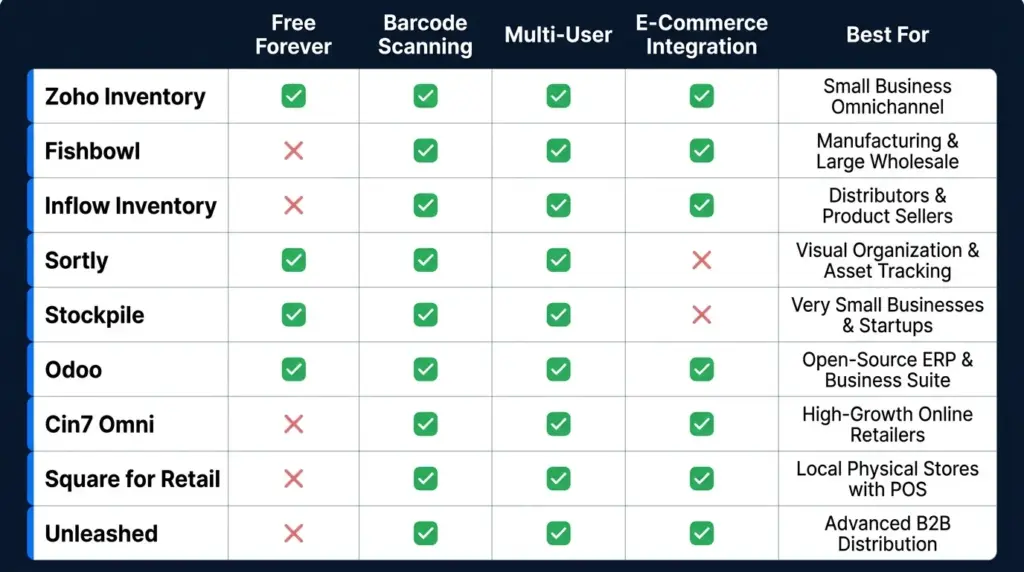
Feature Comparison at a Glance
| Tool | Free Forever | Barcode Scanning | Multi-User | E-Commerce Integration | Best For |
|---|---|---|---|---|---|
| Odoo Inventory | ✅ Yes | ✅ Yes | ✅ Yes | Limited | Growing businesses |
| Zoho Inventory | ✅ (limited) | ✅ Yes | ❌ 1 user | ✅ Shopify, Amazon | Online sellers |
| Square for Retail | ✅ Yes | ✅ Yes | ✅ Yes | Square only | Brick-and-mortar |
| BoxHero | ✅ (100 items) | ✅ Yes | ❌ 1 user | ❌ No | Mobile-first solo use |
| Sortly | ✅ (100 items) | ✅ Yes | ❌ 1 device | ❌ No | Visual asset tracking |
| Snipe-IT | ✅ Self-hosted | ✅ Yes | ✅ Yes | ❌ No | IT/open-source fans |
| Airtable | ✅ (1,000 records) | ❌ No | ✅ Yes | ❌ No | Excel refugees |
| Bitrix24 | ✅ Yes | ❌ Limited | ✅ Yes | ❌ Limited | All-in-one seekers |
| Google Sheets | ✅ Yes | ❌ No | ✅ Yes | ❌ No | Total beginners |
What Free Inventory Software Usually Won’t Give You
Here’s a dose of reality — because I’d rather you know upfront than discover it at 11pm before a big sale.
Most free plans won’t include:
- Automated low-stock alerts via email or SMS (you get visual warnings, not proactive notifications)
- Multi-warehouse tracking across different physical locations
- Raw materials and manufacturing tracking (kitting, bills of materials, production pipelines)
- Unlimited SKUs — most cap out at 50–100 items
- Multi-channel automated inventory sync across Shopify + Amazon + eBay simultaneously
If any of those features are critical for your business right now, it may be worth paying for a tool that covers them properly. Platforms like Katana Cloud Inventory (great for small manufacturers) or inFlow Inventory (excellent for B2B/wholesale) offer free trials worth exploring before committing.
Frequently Asked Questions
Can I scan barcodes with free inventory software? Yes! Tools like Odoo, Zoho, BoxHero, and Square all allow barcode scanning — either via a connected scanner or your smartphone camera. Curious about the tech behind it? Here’s how barcode scanning works in plain English. It’s one of the most underrated features of modern free tools.
Can multiple employees use free inventory software at the same time? Most proprietary free tiers limit you to a single user. If your whole team needs simultaneous access, look toward Odoo (genuinely multi-user on the free tier) or a self-hosted open-source option like Snipe-IT.
How do I move my data from Google Sheets into one of these apps? Almost every platform on this list accepts a standard .csv or .xlsx import. Clean up your columns (product name, SKU, quantity, price), export from Sheets, and upload. Takes maybe 20 minutes once your data is tidy.
Can small manufacturers use free tools for raw materials? It’s tough. Most free platforms are built for finished-goods tracking. For raw material pipelines, multi-stage production, or bill-of-materials management, you’ll likely need a paid tier or a specialized platform like Katana.
Is open-source inventory software safe? Absolutely — if you configure it securely and run regular database backups. The advantage of open-source is total data portability and zero risk of vendor lock-in. Your data stays yours, always.
How to Choose the Right Free Inventory Tool for You
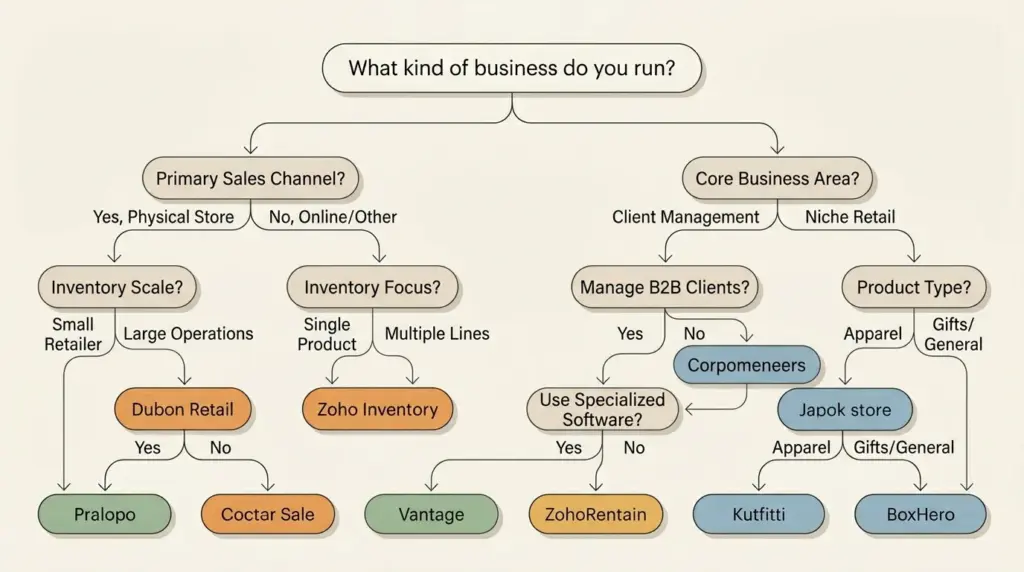
Here’s a simple decision tree to cut through the noise:
- Selling online (Shopify/Amazon)? → Start with Zoho Inventory
- Physical retail store with a POS? → Go with Square for Retail
- Solo business, 100 items or fewer? → Try BoxHero or Sortly
- Tech-savvy and want total control? → Self-host Snipe-IT or Odoo
- Growing team that needs multi-user access? → Odoo is your best bet
- Just starting and confused by everything? → Airtable with a template is a gentle on-ramp
The Bottom Line
Free inventory software has come a long way. In 2026, you genuinely don’t need a big budget to get organized — you need the right tool for your specific situation.
Start simple. Pick one platform, import your data, and use it consistently for 30 days. You’ll quickly discover whether it fits or whether you need to level up. The worst move? Staying stuck in a spreadsheet because you haven’t had time to explore the alternatives.
Your future self — the one who actually knows what’s in stock before a customer asks — will thank you.
Ready to ditch the spreadsheet chaos? Pick one tool from this list today and spend 20 minutes setting it up. That’s it. Twenty minutes could be the difference between scaling smoothly and spending another late night manually reconciling stock counts.
And if you found this guide helpful, share it with a fellow entrepreneur who’s still living in spreadsheet purgatory. They need to hear this.
Related reading: How to Track Small Business Inventory for Free | Best Free Barcode Scanner Apps for Android | Free Multi-Channel Inventory Management Tools Compared