

Let me paint you a picture. It’s 2 AM. Your website just crashed. You’re refreshing your hosting dashboard like it owes you money. Your traffic is gone, your sales are bleeding out, and your “budget” shared host’s support queue is 47 people deep.
Sound familiar? Yeah. I’ve been there.
Here’s the thing — most of that pain is completely avoidable. The culprit isn’t your WordPress theme, your plugins, or even your traffic spikes. It’s the foundation underneath all of it: your hosting. And if you’re still on generic shared hosting in 2026, you’re essentially building a skyscraper on a sandbox.
Enter managed WordPress hosting — the upgrade that quietly runs your site like a well-oiled machine while you focus on, you know, actually growing your business.
This guide breaks down everything you need to know: what managed hosting really means, the best providers on the market right now, and how to pick the right one without overthinking it.
What Is Managed WordPress Hosting, Really?
Let’s cut through the marketing fluff.
Managed WordPress hosting is a specialized service where your hosting provider takes care of all the technical backend stuff that typically makes WordPress owners sweat. We’re talking:
- Automatic daily backups
- WordPress core and security updates
- Server-level caching and performance optimization
- Real-time malware monitoring and patching
- Expert WordPress support (not generic “have you tried turning it off and on again” support)
Think of it like the difference between renting a raw apartment versus hiring a property management company. In the raw apartment, you fix the pipes, you deal with the boiler, you call the exterminator. With a managed service, all of that is handled. You just… live there.<blockquote> “Managed WordPress hosting covers all the technical aspects of running a WordPress site — security, speed optimization, updates, daily backups, uptime, and scalability. This hands-off approach saves time and helps avoid the stress of dealing with server management.” — WPBeginner, 2026 </blockquote>
And here’s why it matters in 2026 specifically: WordPress now powers over 43% of all websites on the internet. That massive footprint also makes it a massive target for hackers. Without proper server-level security, you’re leaving the door ajar. Managed hosting slams it shut and bolts it.
Managed vs. Shared Hosting: What’s Actually Different?
This is the question I get most often, and the answer is simpler than you’d think.
| Feature | Shared Hosting | Managed WordPress Hosting |
|---|---|---|
| Server optimization | Generic (any CMS) | WordPress-specific |
| Resources | Shared with hundreds of sites | Isolated or dedicated |
| Security | Basic (you handle it) | Server-level WAF, malware patching |
| Updates | Manual | Automated (core, plugins, themes) |
| Support | General tech support | WordPress experts |
| Performance | Inconsistent | Consistently fast |
| Backups | Often manual or add-on | Automatic daily backups |
| Staging environments | Rarely included | Usually included |
In standard shared hosting, you’re crammed into a digital apartment complex with hundreds of strangers — and if one of those neighbors gets hacked or floods their server with traffic, your site suffers too. Managed hosting puts you in your own space with a dedicated maintenance crew.
Is It Worth the Extra Cost?
Short answer: yes, for most serious websites.
Long answer: it depends on what your website does.
If you’re running a personal blog with 200 monthly visitors and zero revenue, shared hosting is probably fine. But if you’re running:
- An e-commerce store where every second of downtime costs you sales
- A business website where clients are judging you by your load speed
- A high-traffic blog where ad revenue depends on uptime
- A membership site or LMS with dynamic, uncached requests
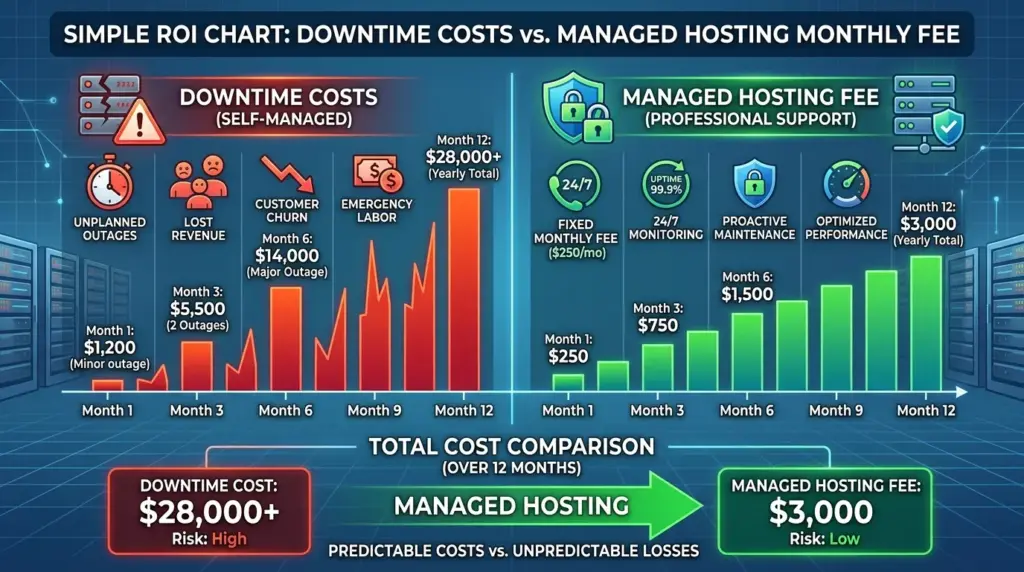
…then the math shifts pretty quickly. The extra $20–$50/month you spend on managed hosting is often less than one hour of lost sales or one emergency developer callout.
The Best Managed WordPress Hosting Providers in 2026
I’ve organized these into three tiers based on budget and use case, because “best” means something very different for a solo entrepreneur versus a scaling agency.
🏆 Premium Tier: For Serious Business & Agencies
1. WP Engine
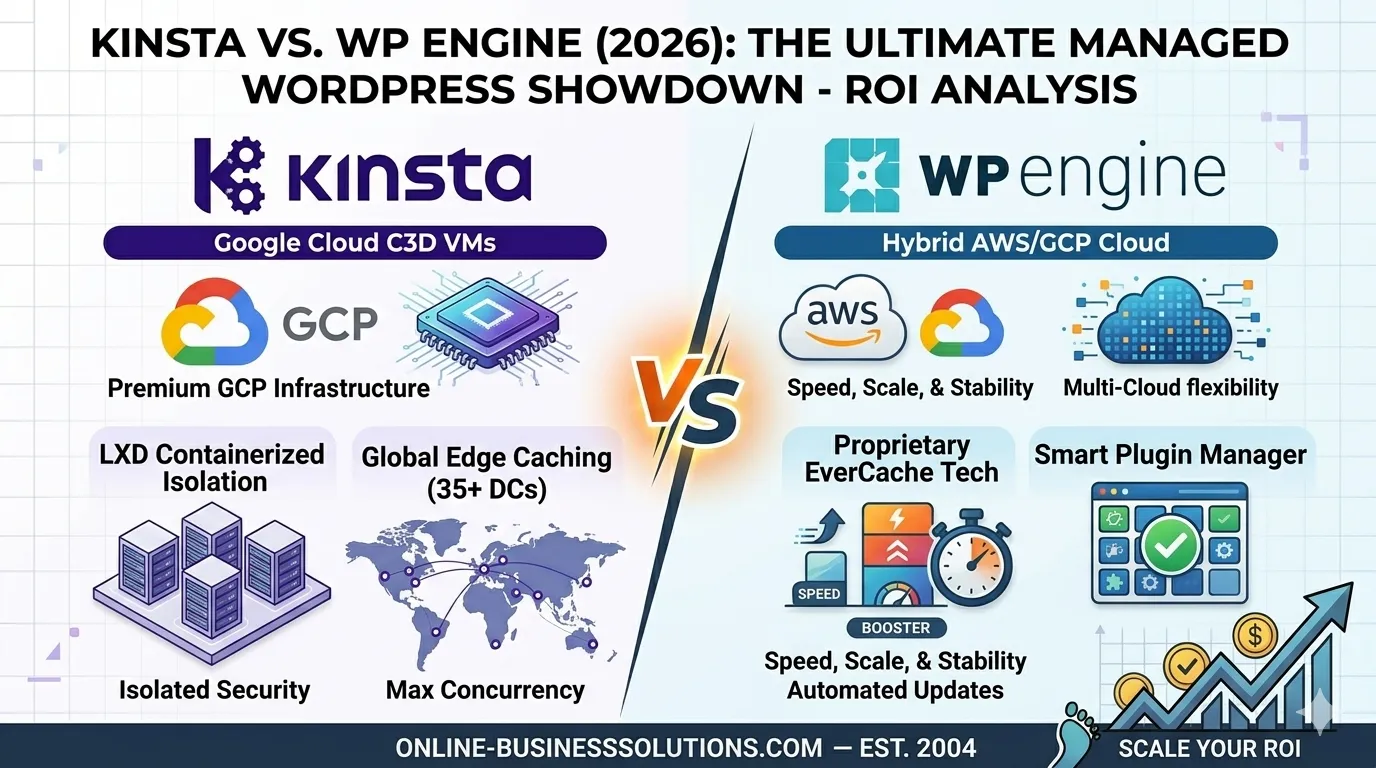
WP Engine is the enterprise gold standard, full stop. Their infrastructure runs on a premium cloud stack with EverCache technology, CDN integration, and a platform tuned exclusively for WordPress. Independent tests in 2026 clocked them at 367ms TTFB with 100% uptime — numbers that make developers weep with joy.
Best for: Corporate brands, digital agencies, high-traffic sites
Standout features:
- Rock-solid isolated staging environments
- Automated daily backups with one-click restore
- Free access to premium StudioPress themes
- Smart plugin manager with safety checks
The catch: It’s pricier than most alternatives, and email hosting isn’t included. You’ll need Google Workspace or similar for that.
2. Kinsta
If WP Engine is the reliable veteran, Kinsta is the flashy overachiever. Built entirely on Google Cloud’s top-tier premium network using C3D virtual machines, Kinsta was recognized as the #1 hosting provider by G2 in 2026. Their custom MyKinsta dashboard is genuinely one of the most elegant management interfaces I’ve used.
Best for: Developers, agencies, performance-obsessed site owners
Standout features:
- Built-in Application Performance Monitoring (APM)
- Isolated site containers (no noisy neighbor effect)
- Free site migrations
- Edge caching across 35+ global locations
3. Rocket.net
Rocket.net does one thing exceptionally: raw speed. They integrate Cloudflare Enterprise directly at the server level, serving full-page cached content from 200+ global edge locations before a request even reaches their origin server. That’s not a hosting trick — that’s a performance cheat code.
Best for: Bloggers and content sites obsessed with Core Web Vitals and SEO performance
4. Pressable
Owned directly by Automattic (yes, the people who literally built WordPress), Pressable runs on custom high-availability cloud architecture with a 100% uptime guarantee. They’re particularly loved in the WooCommerce world for their robust handling of dynamic, high-volume transactional requests.
Best for: WooCommerce stores, scaling e-commerce brands
🥈 Mid-Range Tier: Flexibility Without Breaking the Bank
5. Cloudways
Cloudways is the wildcard. Rather than managing their own servers, they act as a cloud management layer — letting you deploy WordPress on DigitalOcean, AWS, Linode, or Google Cloud with a slick managed interface on top. You get raw cloud speed at managed-hosting convenience, with pay-as-you-go pricing starting around $11/month.
Best for: Developers who want control, startups watching their burn rate
Worth knowing: Their 1GB RAM plans are getting slower under load in 2026 testing. If you need real speed, start with a 2GB plan.
6. SiteGround
SiteGround pulls off a rare trick: genuinely good managed hosting at relatively accessible prices. Built on Google Cloud infrastructure, they’ve layered in custom Speed Optimizer plugins, built-in security setups, and 24/7 support that actually knows WordPress. The community consistently ranks them among the top providers — and that community credibility means something.
Best for: Small businesses, bloggers who want premium tools without premium prices
7. Liquid Web
If your site has heavy resource needs — think large WooCommerce stores, high-volume membership platforms — Liquid Web is built for that. Generous bandwidth, zero overage charges, and LiteSpeed-enhanced servers that handle traffic surges without breaking a sweat. They’re actually the #1 recommendation for managed WooCommerce hosting specifically.
Best for: Resource-heavy WooCommerce stores, mission-critical websites
8. Nexcess
A Liquid Web subsidiary, Nexcess is engineered specifically for dynamic e-commerce performance. The standout feature? Automated visual regression testing — it checks whether a plugin update broke your storefront’s appearancebefore pushing the change live. That alone has saved many store owners from waking up to a broken checkout page.
Best for: WooCommerce and Magento stores needing safe, automated update workflows
9. ScalaHosting
The innovator of the bunch. ScalaHosting uses a proprietary control panel called SPanel (a cPanel alternative that doesn’t charge per-seat licensing) and lets you swap between NGINX, Apache, and OpenLiteSpeed web servers. That level of flexibility at this price point is genuinely uncommon.
Best for: Tech-savvy entrepreneurs who want cloud resources with full customization freedom
💰 Budget Tier: Best Value for Beginners
10. Hostinger
Hostinger is the value king of managed WordPress hosting in 2026 — no contest. Their entry-level pricing is aggressively affordable, yet they’ve backed it up with real performance improvements in recent years. Their AI-guided site setup is legitimately useful for beginners who don’t know where to start.
Best for: First-time WordPress users, bloggers, solopreneurs on a tight budget
11. DreamHost (DreamPress)
DreamHost’s dedicated DreamPress tier gives you isolated cloud resources, one-click staging environments, and the unique credibility of being officially recommended by WordPress.org — one of only a handful of hosts to earn that distinction.
Best for: Bloggers, content creators who want a trusted name without enterprise pricing
12. Bluehost
The household name. Bluehost remains one of the few officially WordPress.org-recommended hosts, and in 2026 they’ve leaned hard into AI site-building tools that help total beginners structure, design, and launch their first website fast. It’s not the fastest or most feature-rich option — but if you’re brand new and intimidated by the learning curve, Bluehost gets you moving.
Best for: Absolute beginners launching their first WordPress site
10 Questions Every Beginner Should Ask (And Actually Understand)
Q: Does managed hosting include email accounts?
Not always — and this surprises a lot of people. Premium providers like WP Engine and Kinsta deliberately exclude email hosting to allocate 100% of server resources to web performance. If you need business email included, look at SiteGround, Hostinger, or HostWP.io instead.
Q: Can I use any plugin I want?
Mostly, but not always. Premium managed hosts routinely ban specific plugins that conflict with their built-in caching, security, or backup systems. It’s not arbitrary — it’s to protect server stability for everyone. Check your host’s restricted plugin list before committing.
Q: What are PHP workers, and why should I care?
PHP workers determine how many simultaneous uncached requests your site can process at the exact same moment. For a simple blog, this rarely matters. For a WooCommerce store, membership site, or LMS with logged-in users constantly bypassing cache — it’s critical. Always check this number before choosing a plan.
Q: Do I still need a security plugin?
Generally, no. Top-tier managed hosts deploy server-level Web Application Firewalls (WAF), real-time malware patching, and automated DDoS mitigation. Installing a heavy third-party security plugin on top of that is often redundant — and can actually slow your site down.
Q: What’s a staging environment?
A staging site is an identical, private clone of your live website. It lets you test new plugins, theme changes, or code updates safely — without risking breaking the actual site your visitors see. Any reputable managed host includes this. If they don’t, that’s a red flag.
Q: Will my managed host update my plugins automatically?
Most do, yes. Advanced hosts like Nexcess even run visual regression tests — essentially taking before-and-after screenshots to check if an update changed how your site looks before pushing it live. That’s the kind of safety net that prevents 2 AM panic attacks.
Q: Can I host non-WordPress sites on a managed WordPress plan?
Almost universally, no. The server architecture, caching mechanics, and CLI tools are built exclusively for WordPress. Non-WordPress apps will either fail or be actively blocked.
How to Choose the Right Provider
Here’s my honest framework:
Step 1 — Define your traffic. Under 10K monthly visits? Budget tier is plenty. 10K–100K? Mid-range. 100K+? Premium, no question.
Step 2 — Identify your use case. Running WooCommerce? Prioritize Liquid Web, Nexcess, or Pressable. Running a blog or content site? SiteGround or Kinsta. Building your first site? Hostinger or Bluehost.
Step 3 — Check PHP workers and server specs. Don’t just look at storage and bandwidth. For dynamic sites, PHP workers are the real performance metric.
Step 4 — Confirm email hosting if you need it. Don’t assume — check the plan details explicitly.
Step 5 — Look for staging environments. If a provider doesn’t include staging, they’re not really “managed” in any meaningful sense.
The Bottom Line
Managed WordPress hosting isn’t a luxury in 2026 — it’s the baseline for any website you’re serious about.
Whether you’re launching your first blog or scaling a seven-figure WooCommerce store, there’s a managed hosting option built for exactly where you are. The question isn’t really whether to upgrade — it’s which provider fits your goals right now.
My personal starting recommendations:
- Beginners: Start with Hostinger or Bluehost — both are forgiving, fast enough, and affordable.
- Growing businesses: Move to SiteGround or Cloudways when you start caring about performance.
- Serious e-commerce: Liquid Web, Nexcess, or Pressable. No shortcuts.
- Agencies and enterprise: WP Engine or Kinsta. Worth every dollar.
Your website is your business’s front door. Make sure the foundation it’s built on is actually holding the weight.
Related reading: Managed WordPress Hosting 2026: The Strategic Choice for Fast Brands
Last updated: May 27, 2026